No Code: Predicting Customer Churn Rates.
Watching customers leave is gut-wrenching. Every time someone cancels, it feels personal. You start wondering: Was it the pricing? The onboarding? Did we miss something obvious?
For months, I’d been flying blind with our SaaS startup. We had around 2,000 customers, steady growth, but an uncomfortable truth kept nagging at me: we were bleeding users and didn’t really know why. Sure, we could see who churned after they left, but by then? Too late. The damage was done.
That’s when I stumbled into Livedocs, and honestly, it changed everything about how we think about customer retention.
You can read the analysis here with this notebook.
Or watch the Youtube video here.
Too Much Data, Not Enough Insight
Here’s the thing about running a startup, you’re drowning in data but starving for answers. We had spreadsheets everywhere. CSV exports from Stripe. User behavior logs from Mixpanel. Support ticket data from Intercom. Everything lived in different places, and stitching it together felt like trying to solve a jigsaw puzzle while blindfolded.
I knew machine learning could help predict churn, but every time I looked into it, I hit the same wall. Hiring a data scientist? Way out of budget. Learning Python and scikit-learn myself? Maybe in another lifetime when I had spare hours (which, spoiler: I didn’t). Those fancy enterprise analytics platforms? They wanted five figures annually and a three-month implementation timeline.
What I needed was something fast, accessible, and powerful enough to actually work. Something that wouldn’t require me to become a data scientist overnight.
Enter Livedocs
Livedocs is an “AI data scientist,” and you know what? That’s not marketing fluff. It’s a collaborative workspace that combines notebooks (think Jupyter, but better) with an AI that can actually understand what you’re trying to accomplish.
The setup was almost comically simple. I created an account, and within minutes I was staring at a clean interface that didn’t make me feel like I needed a PhD to use it.
Getting My Data In
First things first: I needed to bring all that scattered data together. From the Livedocs dashboard, I clicked the Data tab and started connecting sources.
I uploaded my CSV files of customers data. The whole process took maybe 10 minutes. Drag, drop, done. Livedocs handles CSV, JSON, Parquet, even Excel files if that’s your thing.
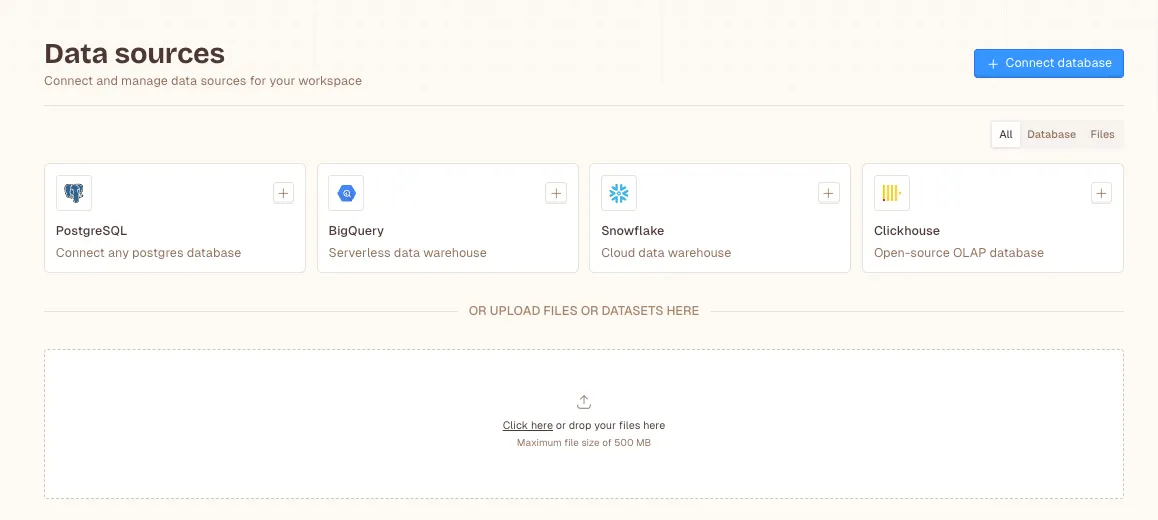
You can also connect directly to databases like PostgreSQL or BigQuery, which I ended up doing later once we got more serious about this.
Building the Churn Prediction Model
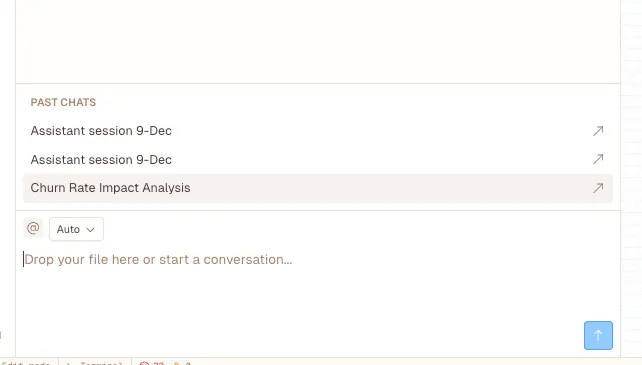
This is where things got interesting. I opened a new document in Livedocs and was greeted by their AI prompt box. It felt a bit like talking to a really smart colleague who knows data science inside and out.
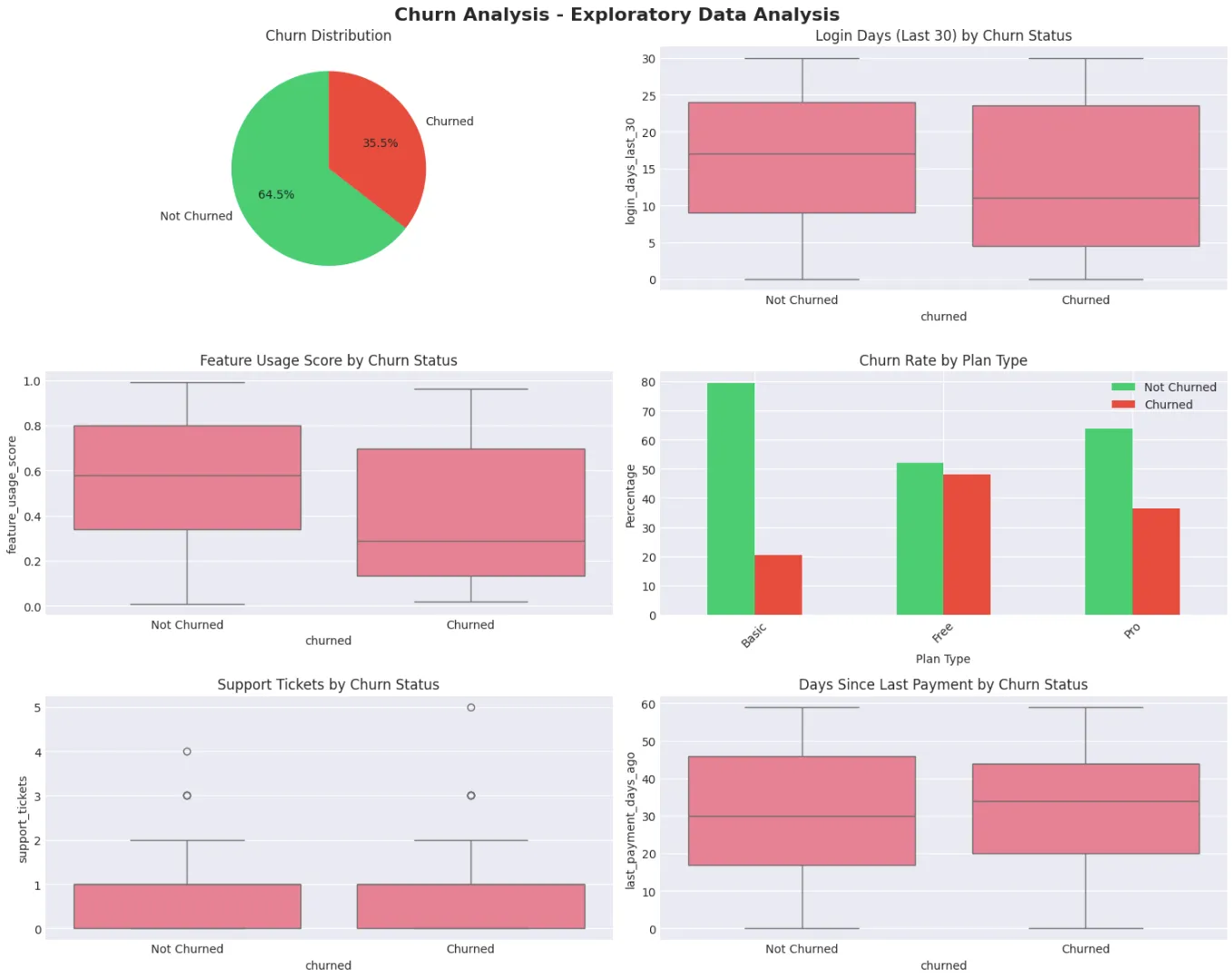
I started simple: “Analyze these customer datasets and help me identify patterns in churned users.” What happened next was… kind of magical? The AI immediately started working. It pulled in my data, performed exploratory analysis, and within seconds showed me visualizations I hadn’t even thought to create.
I could see that customers who logged in fewer than 3 times in their first week had a 67% churn rate within 90 days. Customers who never used our core collaboration feature? 82% churn rate. These were insights we’d been missing completely.
But here’s where Livedocs really shines, I didn’t stop at analysis. I went further.
Training the Predictive Model
I typed into the AI prompt: “Train a machine learning model to predict which current customers are likely to churn in the next 30 days based on their behavior patterns.”
Let me explain what would normally happen if you tried to do this yourself. You’d need to:
- Clean and preprocess all your data
- Engineer relevant features
- Split data into training and testing sets
- Choose an appropriate algorithm (Random Forest? XGBoost? Neural networks?)
- Train the model
- Validate it
- Tune hyperparameters
- Generate predictions
That’s easily a week of work for someone who knows what they’re doing.
Livedocs did it in about 90 seconds.
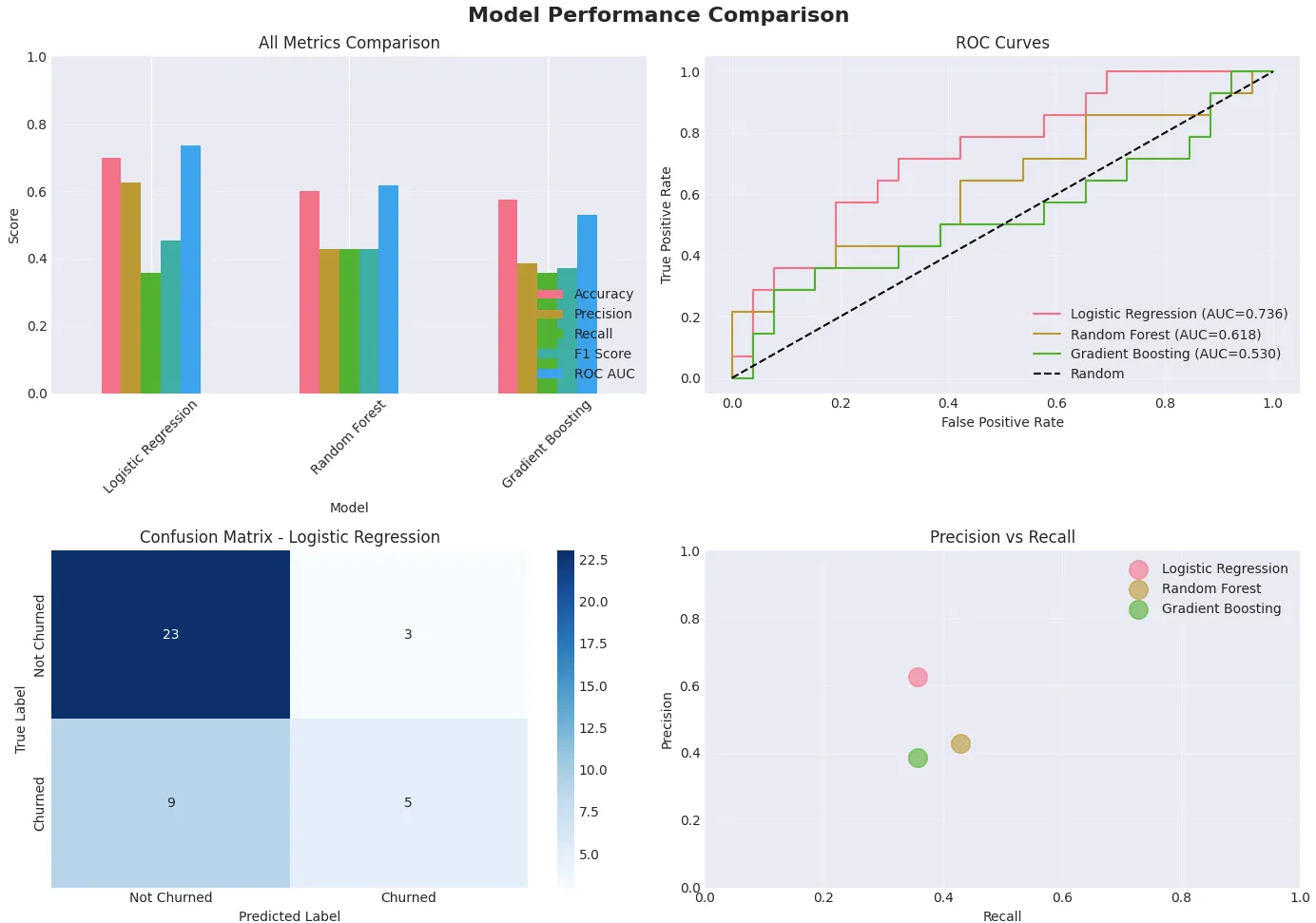
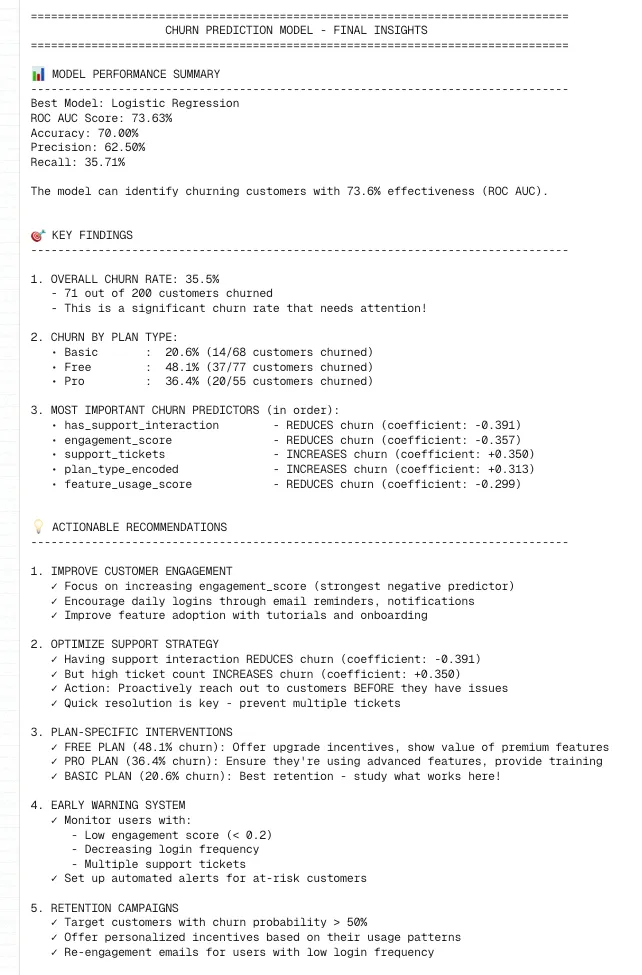
The AI automatically handled data cleaning, identified which features mattered most (login frequency, days since last activity, support ticket volume, and feature adoption were the big ones), and trained a Random Forest classification model. It even showed me the feature importance rankings so I understood why it was making certain predictions.
And also it identified the financial impact due to the churn rate:
Making It Actionable
Raw predictions are interesting, but I needed something my team could actually use. So I asked Livedocs: “Generate a risk score for each active customer and flag high-risk accounts.” The AI created a beautiful, interactive dashboard that showed:
- Current customer count
- Number of high-risk customers (churn probability >70%)
- Medium-risk customers (40-70% probability)
- Safe customers (<40% probability)
We could click on any customer and see exactly why they were flagged. Low engagement? Haven’t used key features? Support tickets unresolved?
Suddenly, our customer success team had a roadmap. Instead of reaching out to everyone (impossible with limited bandwidth), we could focus on the 47 customers most likely to leave.
What I Wish I’d Known Earlier
If you’re thinking about doing something similar, here are a few things I learned the hard way:
Start with clean(ish) data.
Livedocs can handle messy data, but garbage in still means garbage out. Spend an hour making sure your CSVs are properly formatted and don’t have weird encoding issues.
Be specific with AI prompts.
The more context you give Livedocs AI, the better. Instead of “analyze my data,” try “identify behavior patterns in customers who churned within 90 days versus those who stayed active for 12+ months.”
Iterate constantly.
Your first model won’t be perfect. Mine wasn’t. I refined it three times over two weeks, adding new data sources and tweaking which features to prioritize. Livedocs makes iteration painless—just update your data and retrain.
Connect your real-time data sources.
Once I connected our PostgreSQL database directly to Livedocs instead of uploading CSVs, everything became automatic. The model updates daily with fresh data, and our risk scores stay current.
What’s Next
Don’t just stopping at churn prediction. Using the same Livedocs setup, you can now building models to:
- Predict which trial users are most likely to convert
- Identify expansion opportunities (customers likely to upgrade plans)
- Forecast revenue trends for our board meetings
Each new model builds on what we’ve learned. The infrastructure is already there; we’re just asking different questions.
The free plan gives you $10 of AI usage, which was plenty to get started and build my first model. Once we saw the value, upgrading to the Pro plan ($20/seat/month) was a no-brainer. For context, that’s less than what we were spending on separate analytics tools that gave us a fraction of the insights.
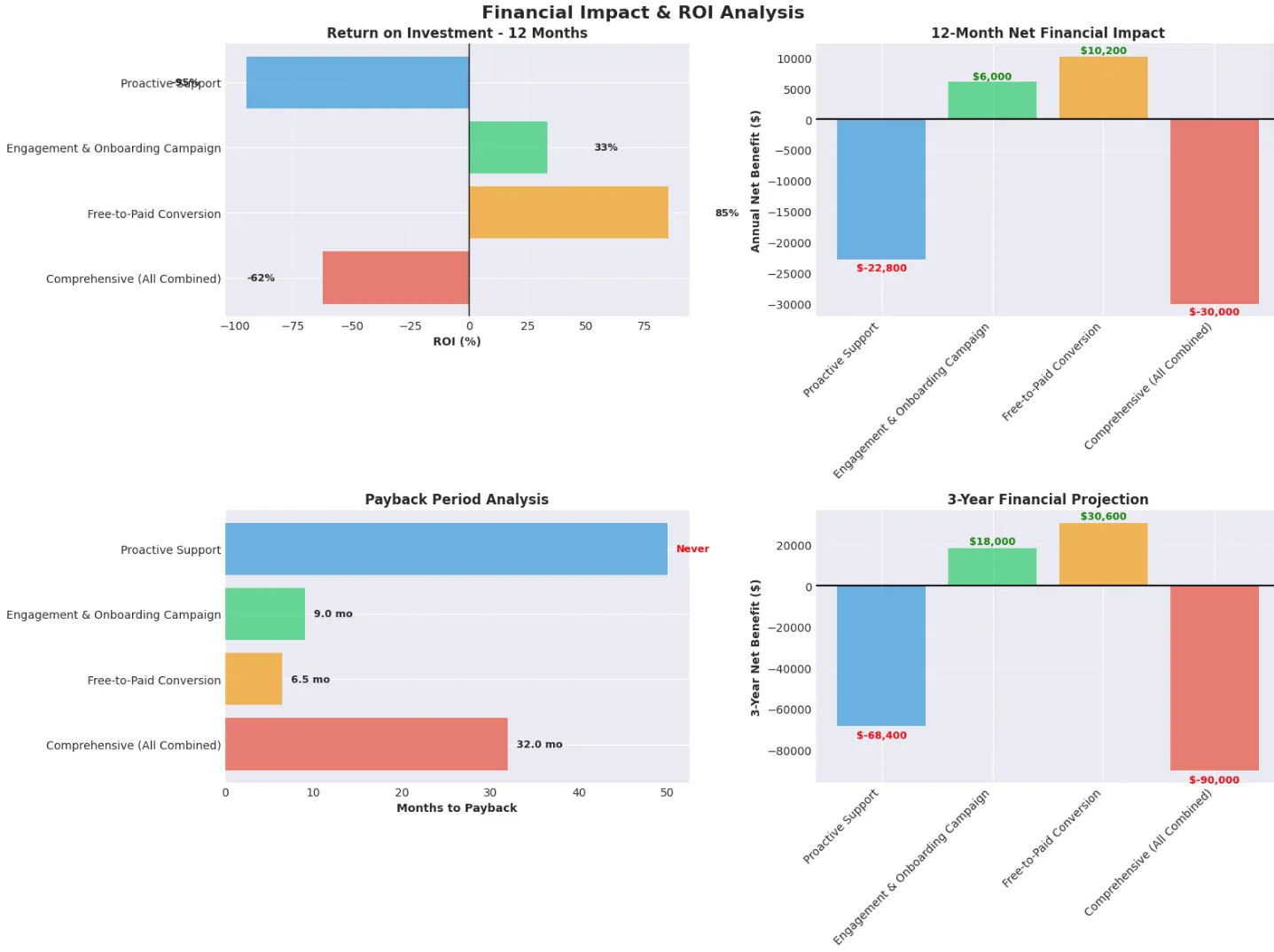
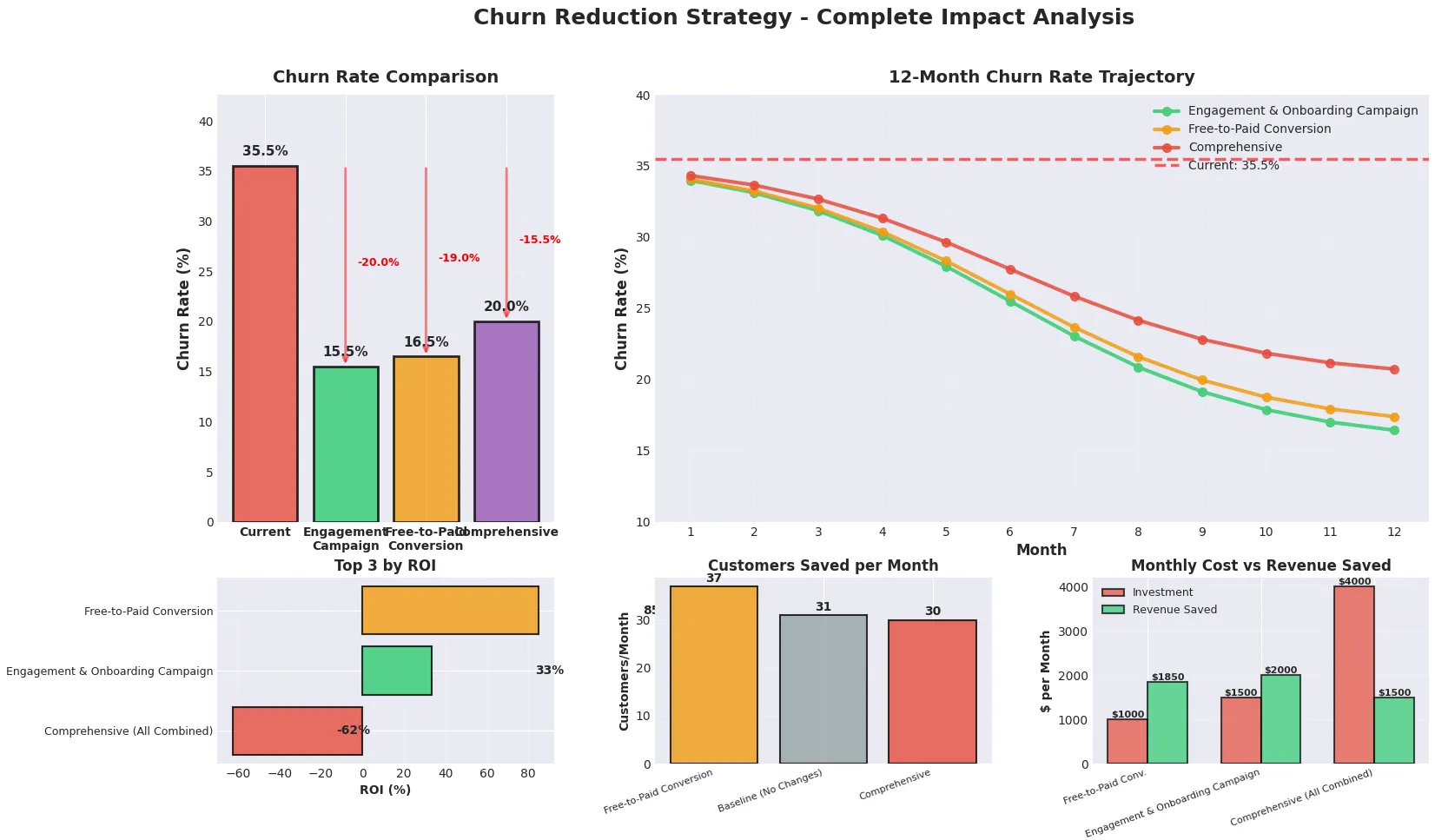
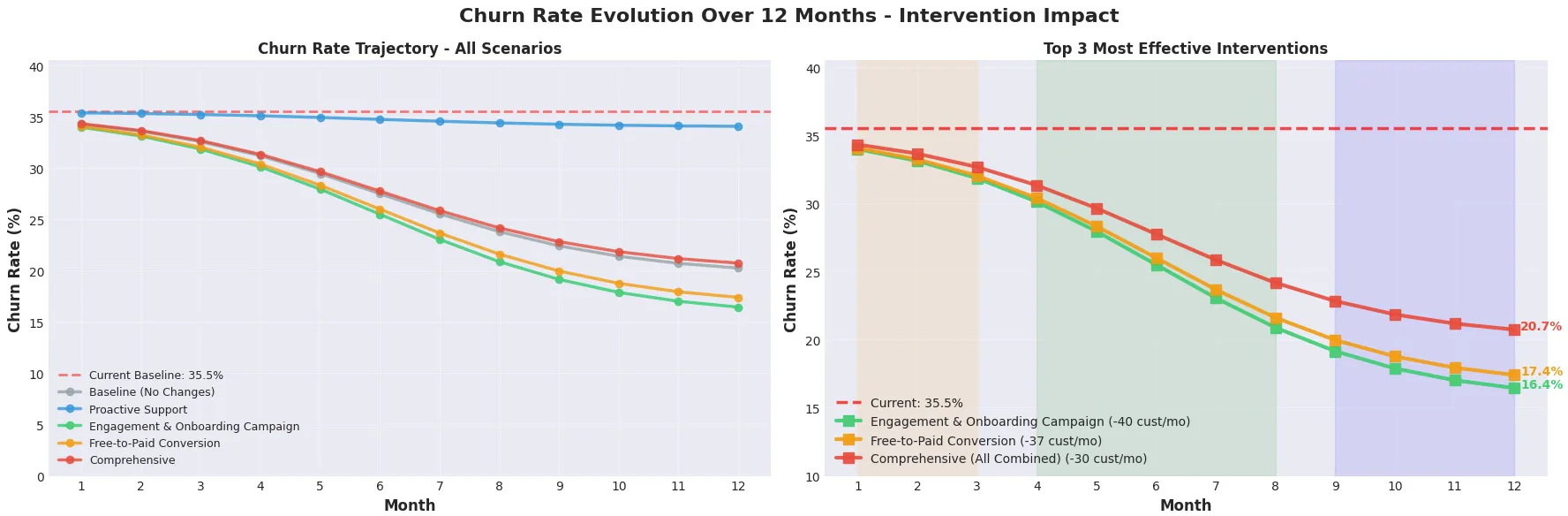
I asked for further analysis from Livedocs by giving me suggestions how can I reduce churn rate:
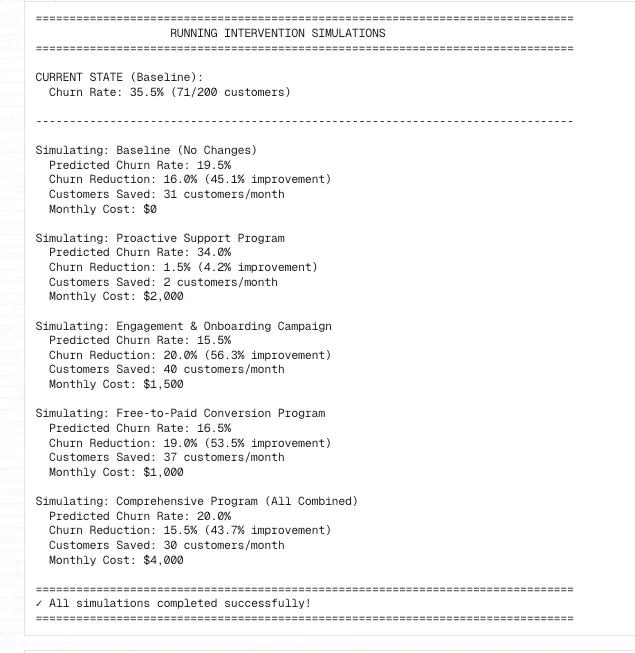
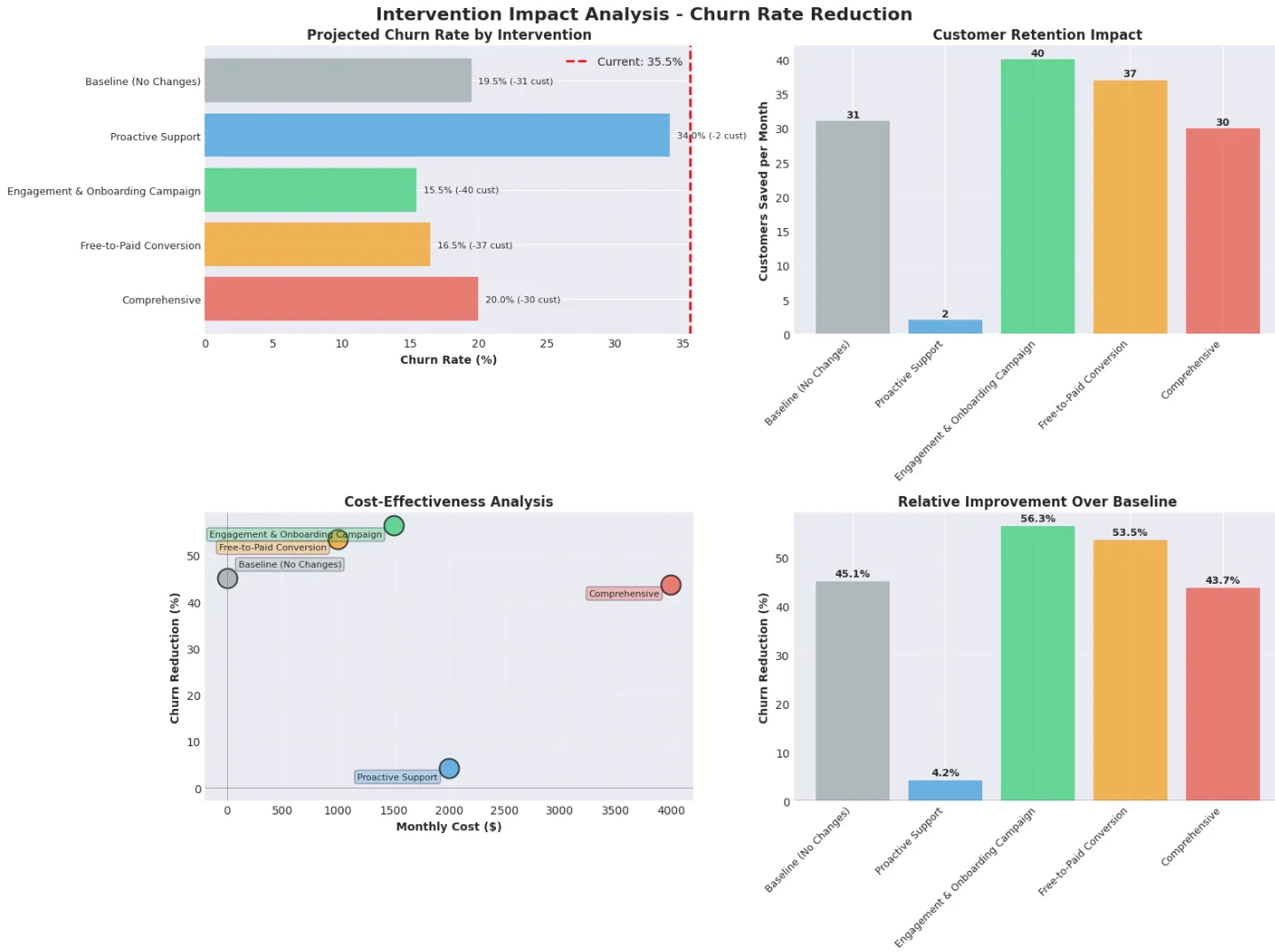
And the impact for each simulation:
Final Thoughts
Perfect prediction is impossible. Even with our 84% accuracy, some customers we flagged as high-risk stuck around. Others we thought were safe churned unexpectedly. That’s life.
But here’s what matters: we went from reactive to proactive. From helpless to informed. From losing customers in silence to fighting for retention with actual intelligence behind our efforts.
If you’re running a startup and customer churn keeps you up at night (it definitely did for me), give Livedocs a shot. The barrier to entry is ridiculously low, the AI genuinely delivers, and you might surprise yourself with what you can build.
You don’t need a data science degree. You just need curiosity, some data, and a willingness to ask better questions.
To make your own analysis like this? Use Livedocs.
- 8x speed response
- Ask agent to find datasets for you
- Set system rules for agent
- Collaborate
- And more
Get started with Livedocs and build your first live notebook in minutes.
- 💬 If you have questions or feedback, please email directly at a[at]livedocs[dot]com
- 📣 Take Livedocs for a spin over at livedocs.com/start. Livedocs has a great free plan, with $10 per month of LLM usage on every plan
- 🤝 Say hello to the team on X and LinkedIn
Stay tuned for the next article!
Ready to analyze your data?
Upload your CSV, spreadsheet, or connect to a database. Get charts, metrics, and clear explanations in minutes.
No signup required — start analyzing instantly